Frictionless for players
Sign up, get a briefing on the big screen, put on a headset that is already in the right team, play, and see your name on the scoreboard. No fiddling, no waiting.


Software suite for VR arenas & LBE venues
XRcade takes care of the headsets, the matches, the big screens and the live stream, so your operators can do what actually makes a visit memorable: look after the guests.
The experience
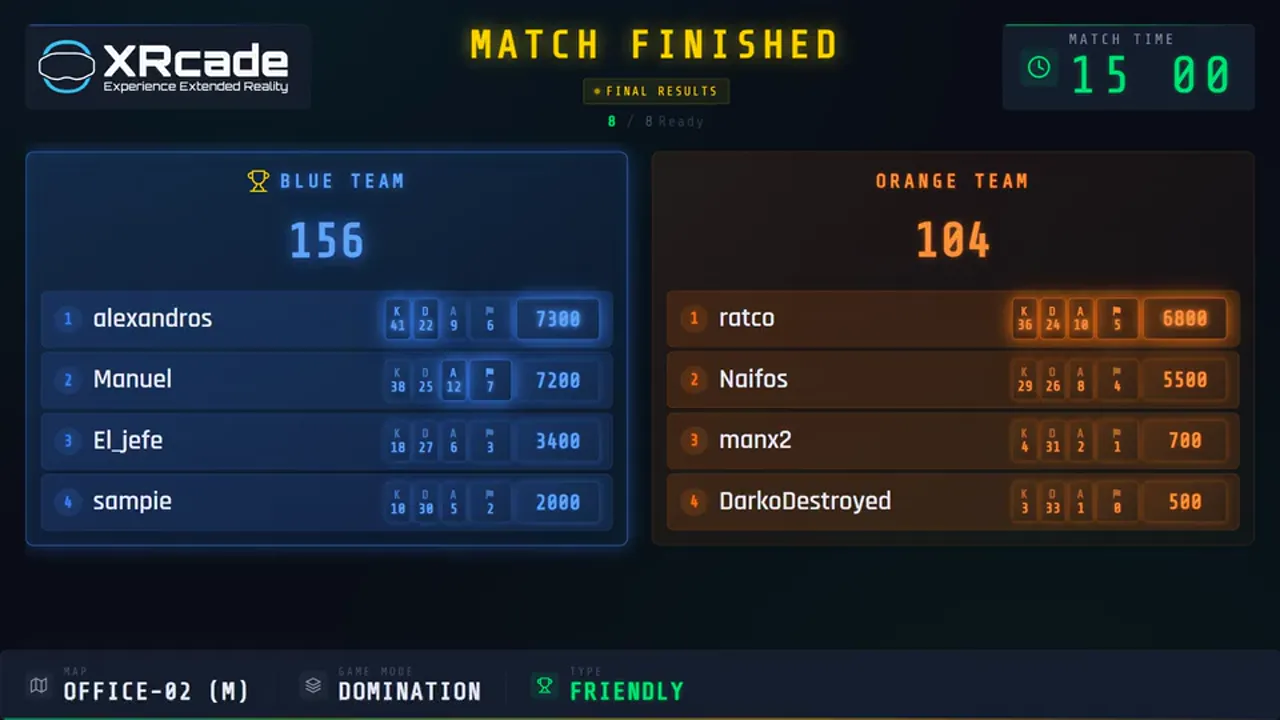
This is what a session looks like from the floor: the lobby fills up, the match runs, and the scoreboard settles it. Your guests see all of it on the big screen.
Sign up, get a briefing on the big screen, put on a headset that is already in the right team, play, and see your name on the scoreboard. No fiddling, no waiting.
One press prepares a whole match. A phone remote covers everything that happens during an evening. The full dashboard is there the moment you need to take over.
Your logo, your colours, your language, your own briefing decks on your own screens. XRcade stays in the background; your brand is what guests remember.
The platform
XRcade is two parts that work as one. The Hall Manager is the control room of your arena: it runs on a PC in your venue and controls everything in the room. The XRcade Cloud is everything else, and what brings it all together: players, bookings, results and branding across every venue and every hall you run.
Player registration and the joining of events and play slots, QR and kiosk sign-up at the door, personal scoring and player engagement. All under your personal brand.
Multi-venue · multi-hallThe control room of your arena. Runs locally on a Windows PC, talks to your headsets, the game, OBS and your TVs over your own network.
On-site · your network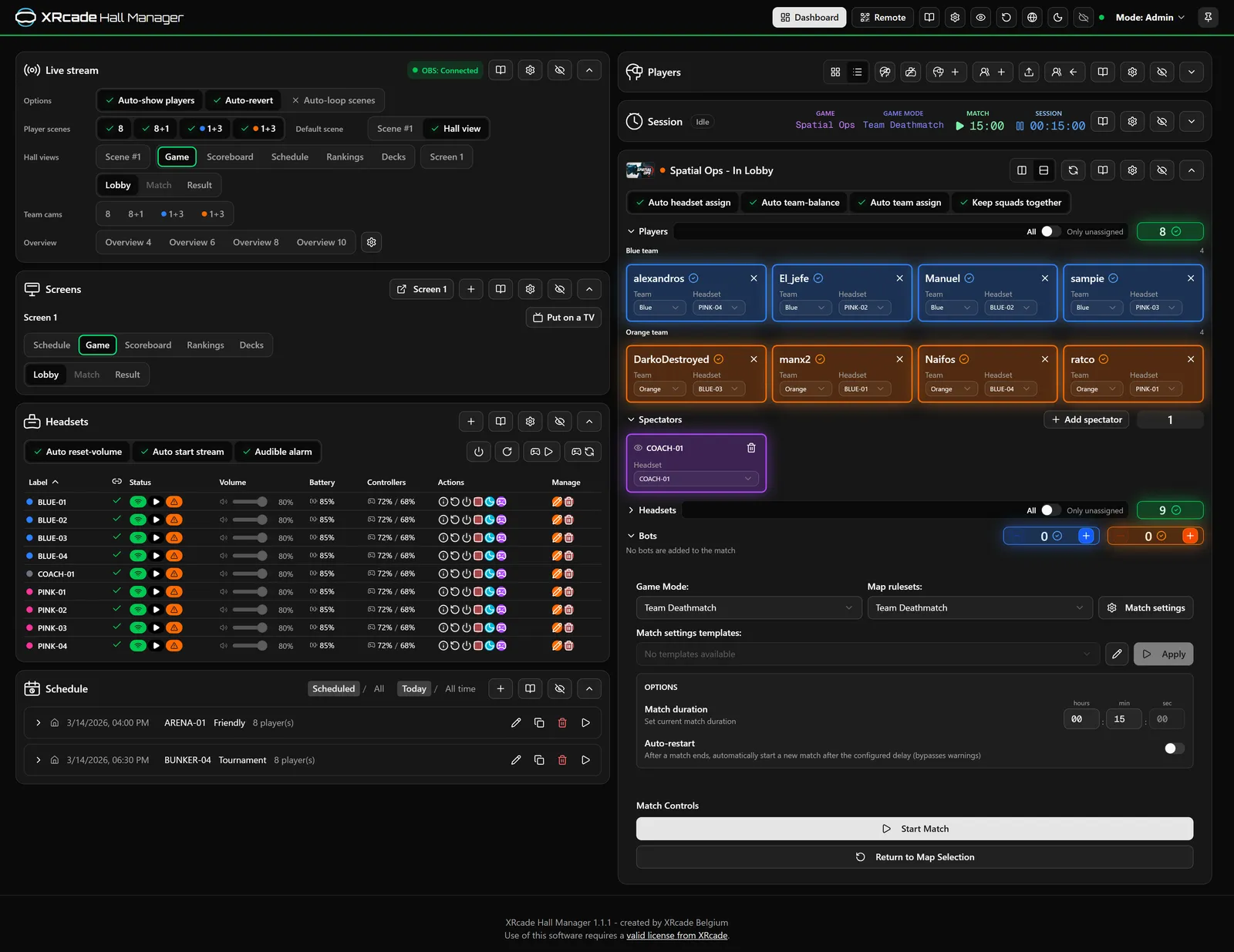
Two ways to operate
Most nights, your operator only needs the remote. When something needs a closer look, the full dashboard is one tap away: same hall, same state, no hand-over.
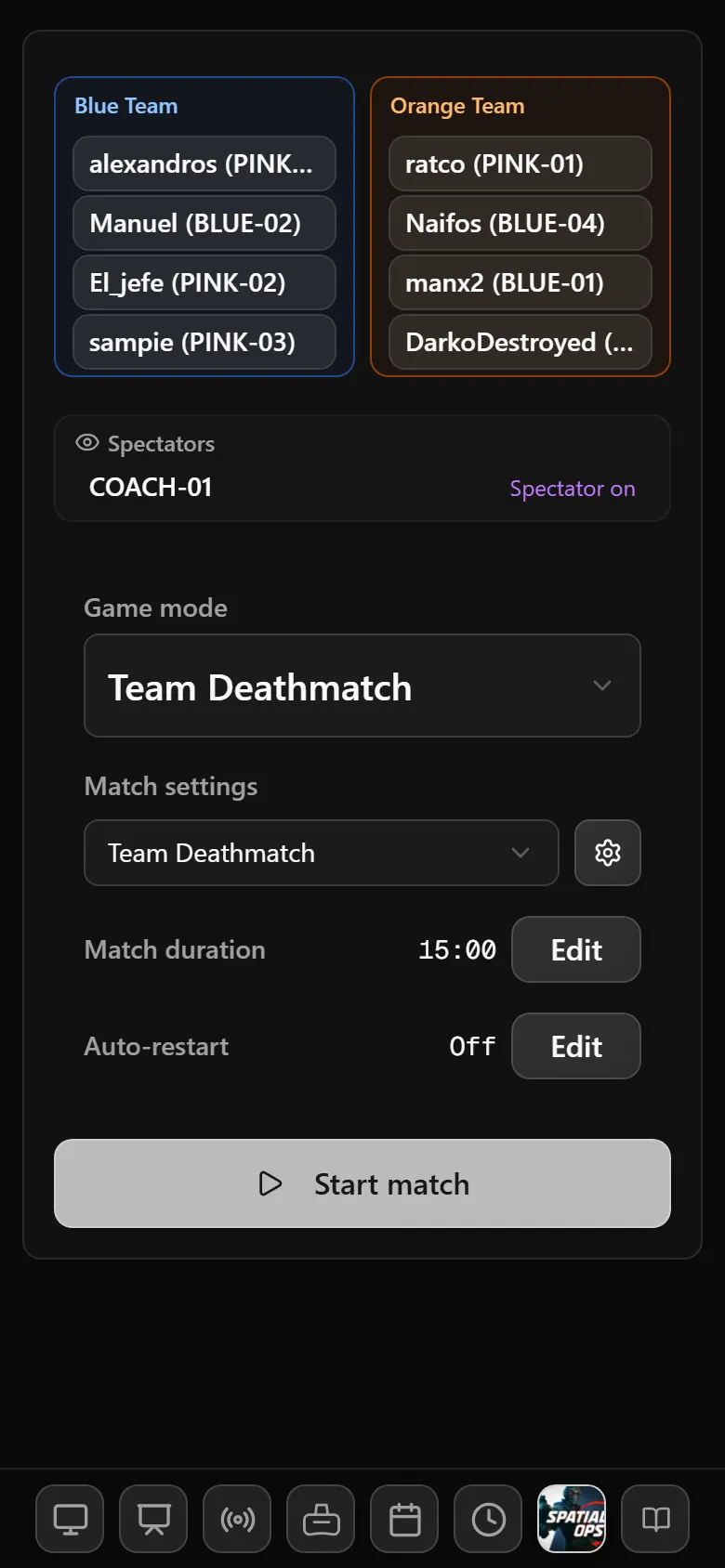
Simple by design
Scan a QR code and any phone or tablet becomes the control for the night. Seven thumb-sized sections cover everything that changes during a session.
Full control
Every part of your hall as a card you can reorder, hide or fold away. Operator mode for daily use, PIN-protected admin mode for the things that shouldn't change by accident.
Features
The short version is on each line. Open any feature for the detail.
One row per headset: label and colour tag, status, headset battery, both controller batteries, volume and stream. You see at a glance which headset is ready to hand out, and which one should go on the charger.
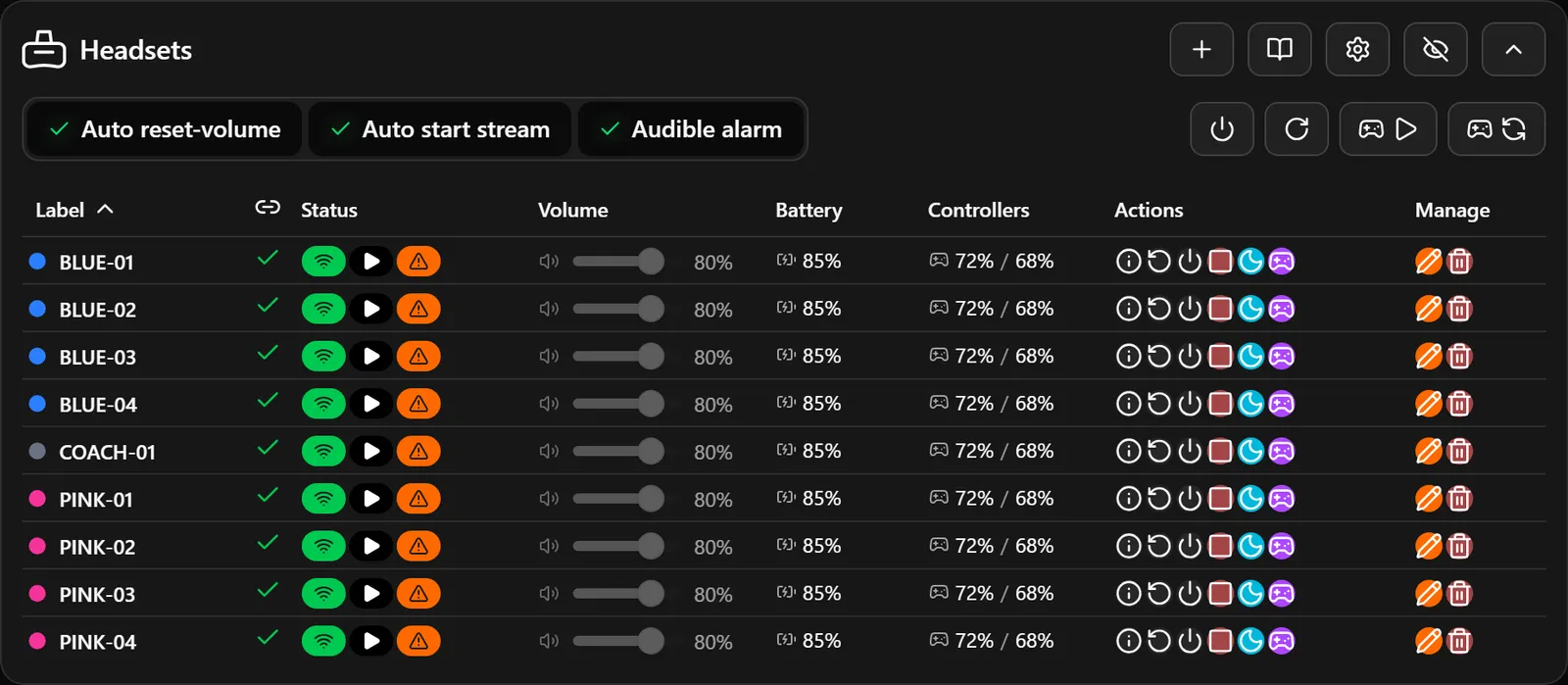
Adding a headset is scan, click, done: plug it in and the Hall Manager finds it. For Pico headsets a Prepare headset wizard installs the XRcade Agent, makes wireless control survive reboots, keeps the headset awake and can put it in kiosk mode, so it boots straight into the game and guests can't wander off into menus. Every step reports what it did, and one click undoes it. Step-by-step guides for both Quest and Pico are built into the manual.
Pick a scheduled match and press launch. XRcade walks the game through every step: open the map, wait for the lobby, set the game mode, apply the rules, place players in their teams on their headsets, add the bots. It ends at Ready to start. The operator only presses Start when the group is ready.
Save complete rule sets (game mode, score limits, timers, weapons) as named templates with a type: Friendly, Tournament or Ranked. Lock a template and nobody can quietly change the rules of a competitive match. While a prepared match waits, XRcade keeps comparing the game's real settings with the template and flags any drift: relaxed for a friendly, strict for a ranked game.
Your hall also keeps its own map catalogue with supported modes, recommended modes and the minimum play area for each map.
Small group? Add bots per team and choose from twelve bot types, from easy guards to rocketeers. XRcade keeps the number you asked for and the number actually in the game in sync. Combined with maps, modes and rule templates, you shape the difficulty and the mood of every session. A kids' party and a company tournament don't have to feel the same.
A group can also book time instead of matches. The session clock tracks it: start, pause, resume, add five minutes because the briefing ran long. Optionally start it with the first match, only count down while people are actually playing, and end the match gracefully when the time is up. It's visible on the dashboard, the remote and the venue screens.
Each screen is simply a web address: open it on a smart TV, mini PC or signage player, scan the QR code and you're done. Drive up to three venue screens independently, plus one for the stream.
A deck is a presentation that plays full-screen on a venue TV: the player briefing, the safety talk, the "how to hold your controllers" video, or an attract loop for the foyer. Your operator drives it from the remote (next, back, jump straight to a chapter, pause the embedded video) while keeping eye contact with the group.
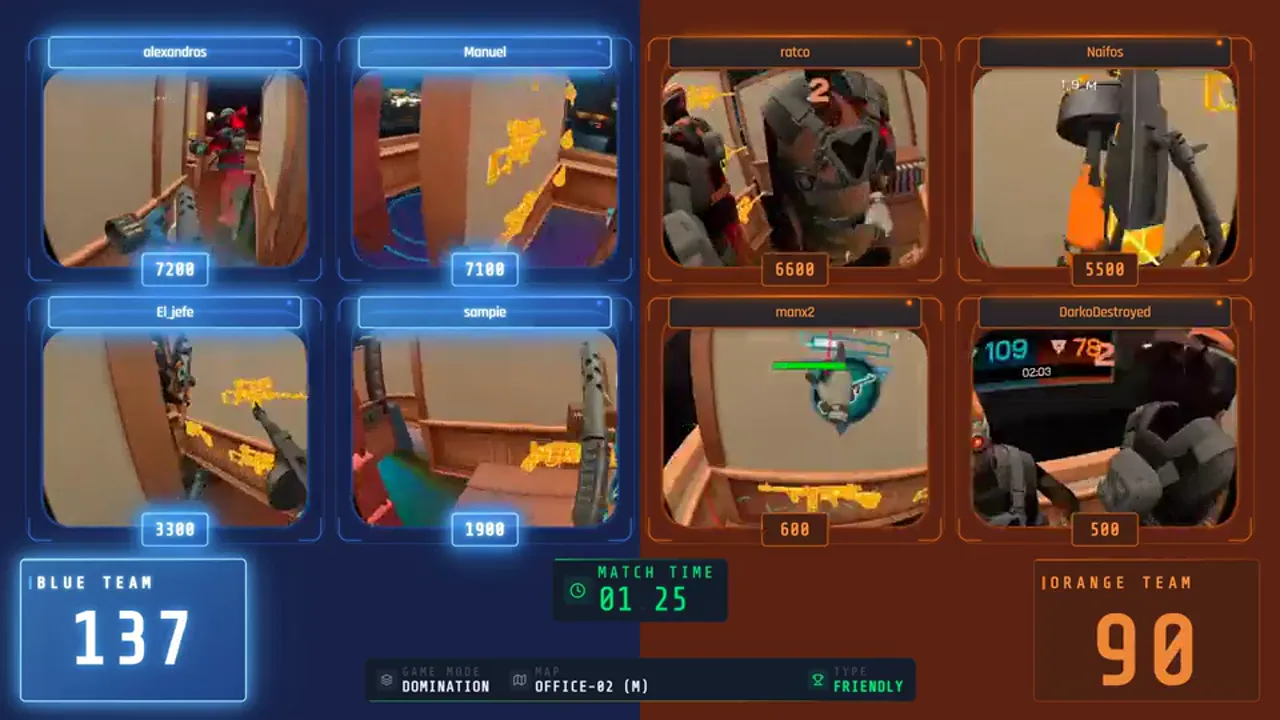
Every headset's view streams to the hall PC, where XRcade drives OBS for you: player cams, team cams, overview grids, your own venue cameras and the hall views, framed by overlays with names, live scores, map, mode and clock.
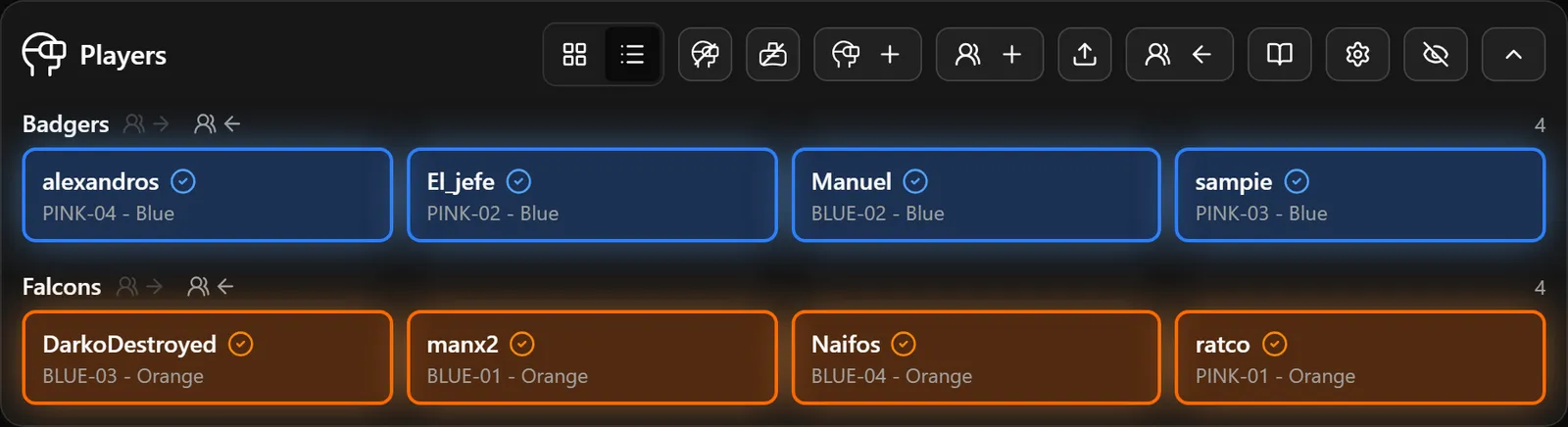
Players who signed up online appear in your hall automatically. Walk-ins are added in seconds: "add player and add to match" does it in one step. Group friends into squads and XRcade keeps them on the same team.
A five-step wizard plans a match: game, time and map, mode and rule template, players and bots, review. Matches can be timed or simply "planned". For tournament and ranked matches, lock the rules and the line-up so nothing changes between planning and playing.
Every finished match is recorded: who played, on which side, kills, deaths, assists and objectives. Boards are calculated from that history, so you can change the format or the period whenever you like without losing anything.
Set your hall's name, tagline, logo and accent colour once; every venue screen and the stream pick them up. Choose a theme per screen. Bring your own decks. In the cloud, your public sign-up pages carry your logo, banner and colour on your own subdomain. On the dashboard, arrange cards in your order, hide what you don't use, switch to a dense layout or dark mode.
English, Dutch, French, German, Spanish, Portuguese, Swedish, Norwegian, Turkish, Vietnamese, Japanese, Chinese, Arabic, Russian, ... The dashboard language and the language of each venue screen are independent: run the dashboard in your operator's language while the lobby screen greets tourists in theirs. The manual is translated too.
Operators get everything they need to run a session. Settings that shape your hall sit behind an admin PIN. Admin-only buttons stay visible but disabled, with a hint, so a new team member learns what exists without being able to break it.
The Hall Manager runs on your own network and talks to your headsets, screens and the game directly, without a round trip to the cloud for every action. The Windows installer sets up the game integration and the OBS scenes for you, and detailed per-area logs mean that when you do need support, we can see what happened.
A complete, illustrated manual lives inside the app: first run, preparing Quest and Pico headsets, network set-up, every dashboard card, every setting, troubleshooting. Each card has a shortcut to its chapter. Not sure where to look? Type a question in your own words and XRcade points you to the right page.
XRcade Cloud
The cloud connects your venue to your players. It is where sign-ups, bookings and results come together, across every venue and every hall you run.
And there is always more to come...
Get in touch
Whether you're planning your first arena or already run a venue and want to offer something new: reach out. No sales script: we listen first, then work out something that fits.